Add money Find jobsWatch videosDocsBuild with AIExamplesUse casesFor agentsDaily storm leadsML Storm ForecastDataCompareStorm mapAPI AccessStorm Mailers Legacy log in Get an API key
Use it with your AI

Ask your AI.
Get the storm facts.

Paste one message into ChatGPT or Claude. Get a plain answer about any address.

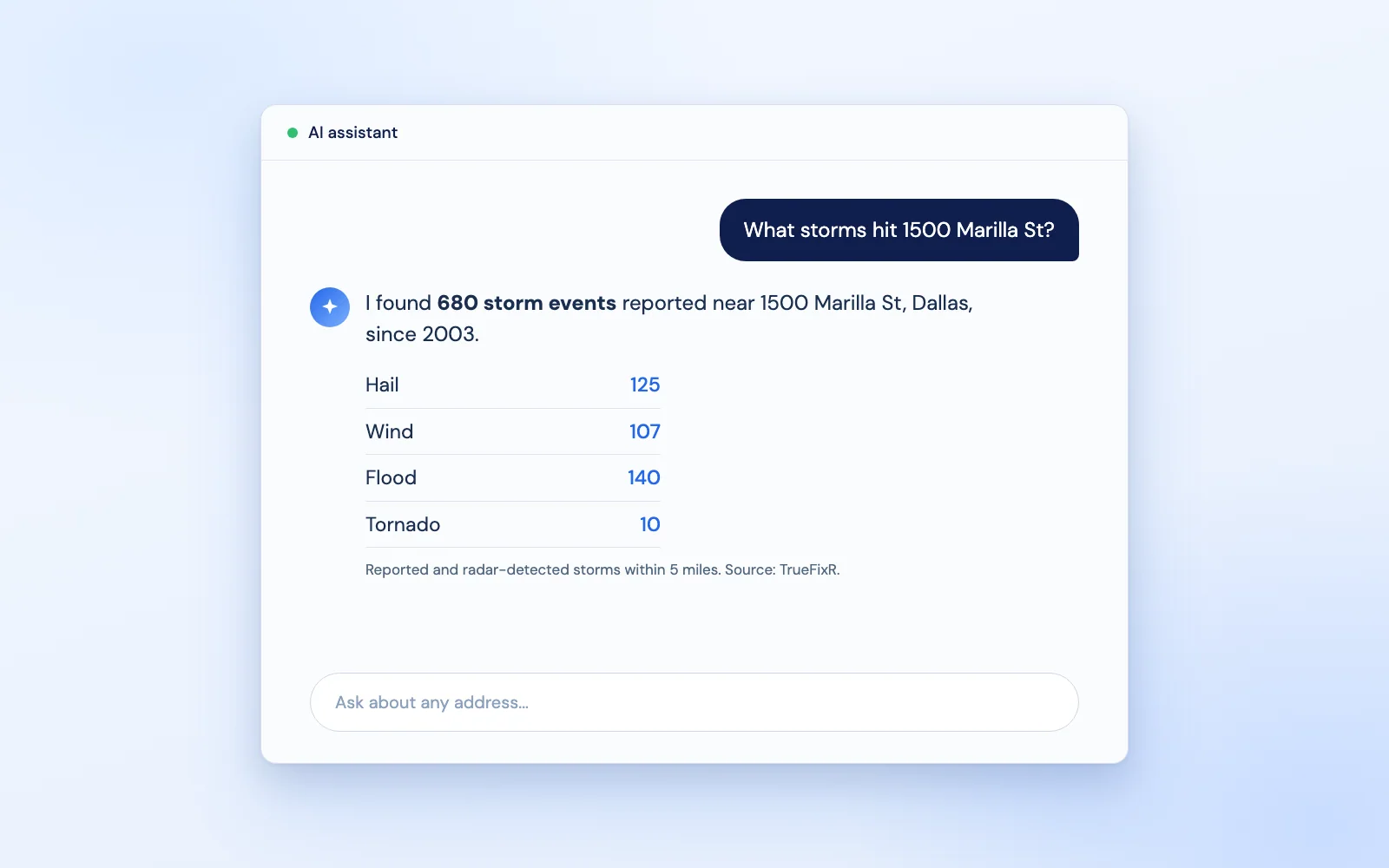
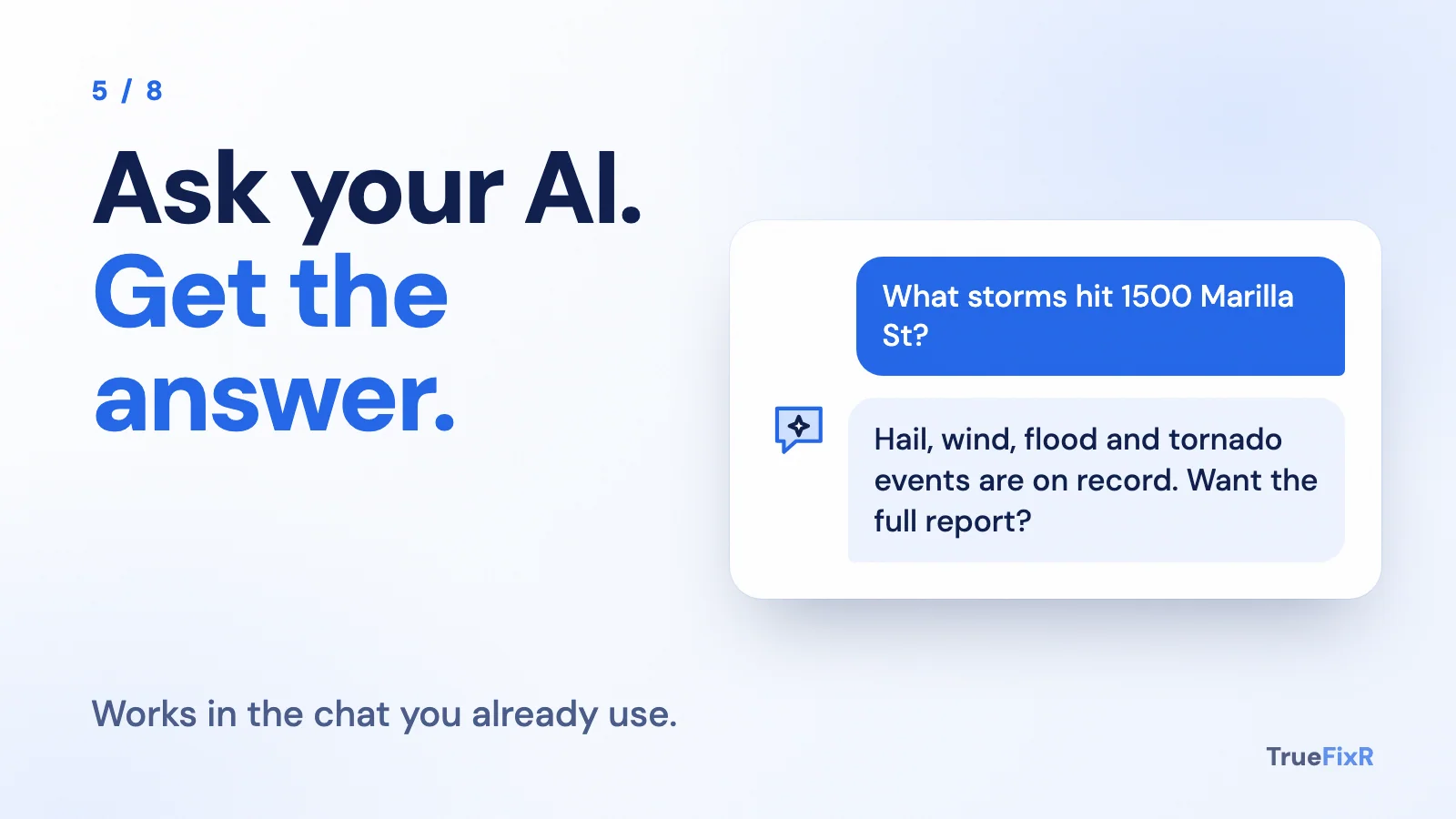
An AI chat asking what storms hit 1500 Marilla St and answering with 680 storm events, including 125 hail, 107 wind, 140 flood and 10 tornado
Slide: ask your AI what storms hit an address and get a plain answer
1Copy2Paste3Read the answer

Real answer from a free look-up. A record of storms near the address, not an inspection. No coding. No contract.

Before you start

Three small things. That is all.

1

ChatGPT or Claude

The free version is fine to try. Open it in your browser.

2

An address

Any US street address. Use your own, a customer's, or the example in the prompt.

3

A key, later

Steps 1 to 3 are free. Steps 4 and 5 can use a paid report. We always tell you the price first.

What you can ask for

Five products. Ask your AI about any of them.

Atlas United risk models for every U.S. address: address-level storm forecasts for the next 24 hours to 10 days, plus every reported storm near that address back to 2003. Pay per address, no contract.

AtlasCast, an Atlas United product

ML Storm Forecast by Address

Per address: structure replacement value in USD (replacement cost, not market value) and the estimated people there, plus the full address, forecast time, storm type, risk label and past storm reports.

$0.05 per address.
Atlas United

Model-Based Weather by Address

The free lean answer: temperature, dewpoint, humidity, wind speed, gust and direction, precipitation and type, pressure, visibility and alerts.

Free lean response.

Atlas United

Model-Based Hourly Forecast by Address

Temperature, dewpoint, humidity, wind, gust, precipitation, visibility, pressure, hail size, lightning rate and a tornado rotation score for the hour you ask about, about 40 core fields with details=true, plus forecast_hour_used and a forecast note.

$0.0002 per call with details=true.

TrueFixR

Storm History by Address: Reported and Radar-Detected Events Since 2003

A formatted report with a reference_id, one line per event, plus the summary view (hazard score, $0.50 per property): per category the event count, most recent date, years since the last event and, for hail, wind and winter, the most severe event.

$0.05 per event line, $10 minimum per report.

TrueFixR

Past Storm Leads by Address: Reported and Radar-Detected, Last 365 Days

Per address: full address, coordinates, storm type, event time, severity with its unit (such as hail inches or wind mph), distance from the event and a hit count for repeat exposure.

$0.05 per address.

Free previews on every product. Forecasts describe what could happen, not what will happen. Not affiliated with NOAA or the NWS.

Five steps

Copy. Paste. Press enter.

Each box is a full request. Click Copy, paste it into ChatGPT or Claude, and press enter. Change the example address to your own if you like.

1

See what storms were reported near an address Free

A storm history report: hail, wind, flood and more, near any address, back to 2003.

Copy, paste into ChatGPT or Claude
Using the TrueFixR storm API (https://data.truefixr.com/llms.txt), give me a storm history report for 1500 Marilla St, Dallas, TX in plain English.

Paste it into ChatGPT or Claude, swap in your address and your key.

More detail for your AI
Copy, paste into ChatGPT or Claude, press enter
I want a storm history report for one property. Please use the free TrueFixR storm data service. Its address is https://data.truefixr.com and a plain list of what it can do is at https://data.truefixr.com/v1/data .
Open this link, with the address filled in: https://data.truefixr.com/v1/data?dataset=history&address=1500%20Marilla%20St%2C%20Dallas%2C%20TX
It is a free preview and needs no key. Tell me in plain English how many storm events are on record near this address, which kinds are most common (hail, wind, flood and so on), and what the full detailed report would cost. Say clearly that this is a record of storms near the address, not an inspection or a damage finding. Do not make any paid request.

What you get: A short, readable storm report for the address, and the price of the full version.

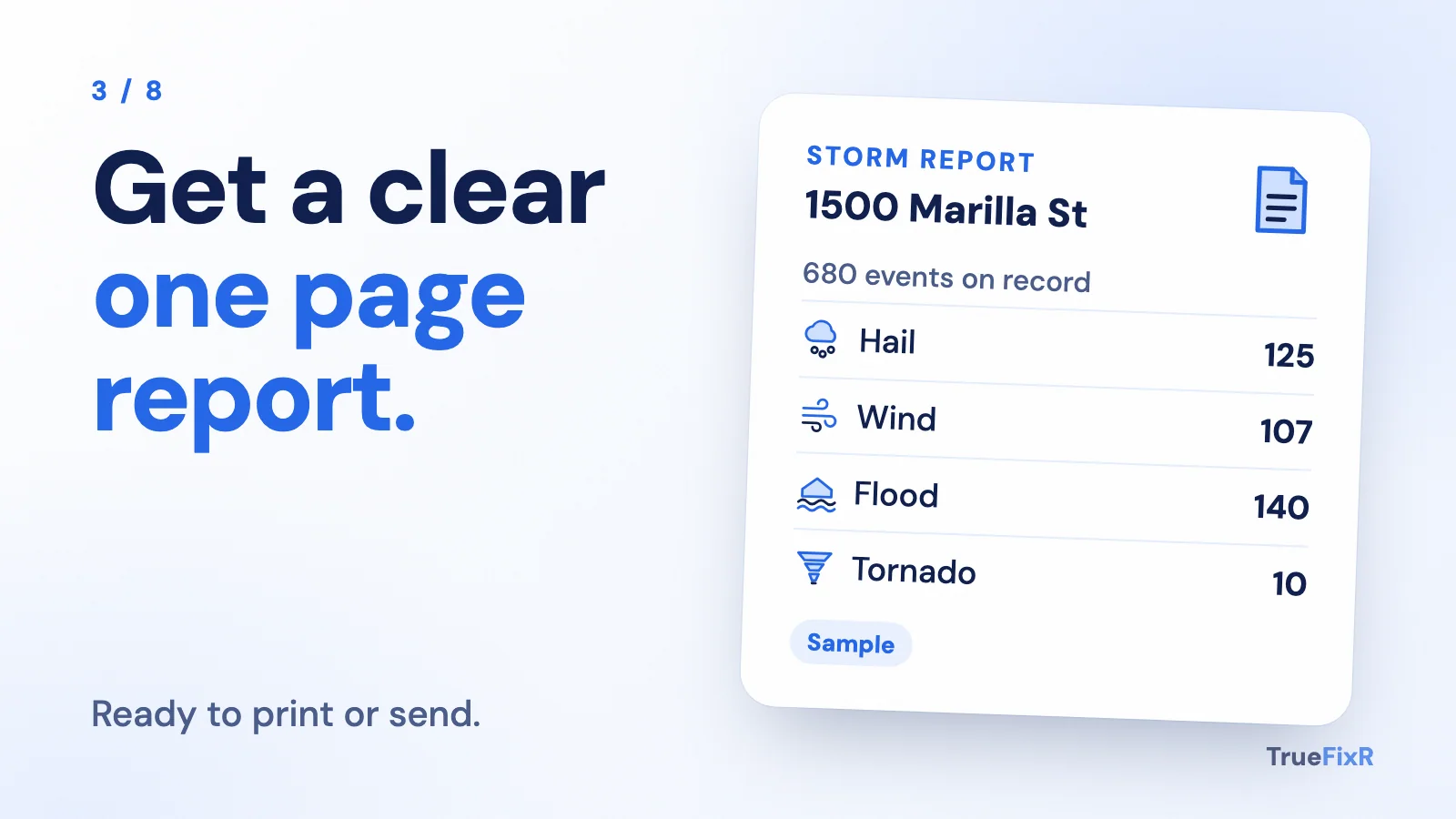
Sample answer"There are 680 storm events on record near 1500 Marilla St, Dallas since 2003, including 125 hail, 107 wind and 140 flood. The full report lists every event and costs $34.00 ($0.05 per line). This is a record of storms near the address, not an inspection."

Other tools call this a hail history report or storm history report.

2

Check a date of loss Free

Someone says storm damage happened on a certain day. Find out if a storm was reported near the address that day.

Copy, paste into ChatGPT or Claude
Using the TrueFixR storm API (https://data.truefixr.com/llms.txt), was there a storm at 2100 Ross Ave, Dallas on 2024-05-28? My key: YOUR_KEY

Paste it into ChatGPT or Claude, swap in your address and your key.

More detail for your AI
Copy, paste into ChatGPT or Claude, press enter
Someone says storm damage happened at a property on a certain date. Please use the free TrueFixR storm data service (https://data.truefixr.com) to check.
Open this link: https://data.truefixr.com/v1/data?dataset=history&address=1500%20Marilla%20St%2C%20Dallas%2C%20TX&date_of_loss=2024-05-28
It is a free preview and needs no key. Tell me in plain English whether a severe-weather event was reported or radar-detected near the address on that date, and what happened just before and after. Say clearly that this is a weather record, not a finding about damage. Do not make any paid request.
Address: 1500 Marilla St, Dallas, TX. Date: 2024-05-28.

What you get: A plain yes or no for that day, with nearby storms around it.

Sample answer"Yes, within 5 miles. A severe-weather event is on file within 5 miles of this address on 2024-05-28. It depends on how close you need it: for this example, 1 mile = No, 5 miles = Yes. This is a weather record, not a damage finding, and not a claim the storm hit the address."

Other tools call this a date of loss report. It is used on insurance claims.

3

See the weather and alerts right now Free

Model-Based Weather by Address and any active severe weather alerts for a spot on the map.

Copy, paste into ChatGPT or Claude
Using the TrueFixR storm API (https://data.truefixr.com/llms.txt), what is the weather right now at downtown Dallas, and is there any active severe weather alert?

Paste it into ChatGPT or Claude, swap in your address and your key.

More detail for your AI
Copy, paste into ChatGPT or Claude, press enter
Please use the free TrueFixR storm data service (https://data.truefixr.com) to check the weather right now at downtown Dallas.
Open this link: https://data.truefixr.com/v1/data?dataset=weather&lat=32.78&lon=-96.80
It is free and needs no key. Tell me in plain English: what is the weather there right now, is it raining, and are there any active severe weather alerts? If there are no alerts, say so. Do not make any paid request.

What you get: Current conditions and a clear yes or no on active alerts.

Sample answer (a quiet day)"There are no active severe weather alerts at downtown Dallas right now, and it is not raining."

Other tools call this storm tracking. The weather includes any active severe alert; you send your own messages.

4

Find out which of your customers a storm could reach 5 cents per address

Upload a list. Get back each place's county forecast status, A (low risk) to F (extreme), so you know where to look first. County-level, not an address forecast: for that, use ML Storm Forecast by Address. It says a storm could happen, not that it will.

Copy, paste into ChatGPT or Claude
Using the TrueFixR storm API (https://data.truefixr.com/llms.txt), give every place on my spreadsheet (up to 500, with latitude and longitude) its county forecast status. Tell me the price first. My key: YOUR_KEY

Paste it into ChatGPT or Claude, swap in your address and your key.

More detail for your AI
Copy, paste into ChatGPT or Claude, press enter
I have a spreadsheet of customer places with latitude and longitude columns (if I only have street addresses, tell me a free way to get latitude and longitude). Please write me a small program that gets each place's county forecast status, A (low) to F (extreme), using the TrueFixR storm data service, so I know which customers sit in a county with a storm forecast in the next day.
How it works: send up to 500 places at a time to https://data.truefixr.com/v1/portfolio/risk with a body like {"locations":[{"lat":30.27,"lon":-97.74,"label":"customer name"}],"window":"24h"} and the header Authorization: Bearer YOUR_KEY . It costs $0.05 per place.
Important: first make it a dry run that only prints how many places there are and the total price, and only make the real request when I add the word --go . I will put my real key in myself, so never ask me to paste it into this chat. Keep it in a settings file, not inside the code. Then show me only the customers in counties with status C, D or F, worst first. Remind me that a status means a storm could happen, not that it will. Explain how to run it step by step, as if I am not technical, including how to install Python.

What you get: A short call list, worst first, and the cost shown before anything is charged.

Sample answer"I found 120 places. Cost: 120 x $0.05 = $6.00. Nothing has been charged. Add --go to run it." After it runs: "Travis County, TX: county status C (elevated)."

Other tools call this a storm forecast for a customer list. It is county-level.

5

Connect your AI, then just ask Free to connect

Plug TrueFixR into ChatGPT, Claude or Cursor once. After that you type a question and it looks up the real data for you.

Copy, paste into ChatGPT or Claude
Connect to the TrueFixR storm data server (https://mcp.atlasunited.io/mcp) so I can ask you storm questions about any US address. Then tell me what storms were reported near 1500 Marilla St, Dallas.

Paste it into ChatGPT or Claude, swap in your address and your key.

More detail for your AI
Copy, paste into ChatGPT or Claude, press enter
I want to ask you storm questions about any US address and have you look up real data. Please walk me through adding the TrueFixR connector to the app I am using (Claude, ChatGPT or Cursor). The connector address is https://mcp.atlasunited.io/mcp . Go step by step, as if I am not technical, and ask me which app I use first.
When it is connected, test it with this question: are there any severe weather alerts right now at downtown Dallas (32.78, -96.80)? Use free look-ups only. Ask me before any request that costs money.

What you get: An AI that answers storm questions with live data. You never write code.

Sample answer"Connected. I checked downtown Dallas: there are no active severe weather alerts right now."

Other tools call this storm tracking you can simply ask for.

What it costs

Cents, not a contract.

Free

Look-ups and previews: how many addresses with a reported storm nearby in a county, date of loss yes or no, model-based weather and alerts. No key.

$0.05 per address

Past Storm Leads by Address, ML Storm Forecast by Address and other address-level records. The price is shown first.

$0.50 per property

A one-property summary of its storm history by storm type.

Find storm leads
Using the TrueFixR storm API (https://data.truefixr.com/llms.txt), how many addresses had hail reported nearby in Dallas County, TX in the last 30 days? My key: YOUR_KEY

A full storm history report is $0.05 per line, with a $10.00 minimum per report. Everything is prepaid. No contract, no monthly fee. See all prices.

For developers: code, recipes and more promptsClaude and OpenAI tool use, MCP setup, a tiny web app, REST vs MCP vs x402. Open to see the code.

More prompts

Eight more prompts to paste.

Each box below is a full request. Paste it into Claude or ChatGPT and it writes the tool or gives you the answer, and explains how to use it. Replace the example address or file with your own. An API key is a password that lets your tool ask us for data: write YOUR_KEY as shown, and put your real key in only on your own computer.

1. Add a storm history column to my spreadsheet

Copy, paste into ChatGPT or Claude
Using the TrueFixR storm API (https://data.truefixr.com/llms.txt), add a storm history column to my spreadsheet of customer addresses. Tell me the price first. My key: YOUR_KEY

Paste it into ChatGPT or Claude, swap in your address and your key.

More detail for your AI
Paste into Claude or ChatGPT
I have a list of customer addresses in a spreadsheet (a CSV file with an address column). Using the TrueFixR storm API, write me a script that adds a storm-history column showing how many reported and radar-detected storm events are near each address, split by storm type. Base URL: https://data.truefixr.com. Docs: https://truefixr.com/docs.html . Plain list of everything the API can do (free): https://data.truefixr.com/v1/data . Technical spec: https://data.truefixr.com/openapi.json .
For each row call GET /v1/data?dataset=hazard_score&address=<the row's address>. That free preview needs no key. Wait 1 second between calls. A full paid summary per property costs $0.50 each (the menu explains how to request it), but do that only if I say so. My API key is YOUR_KEY. I will replace YOUR_KEY with my real key myself, so never ask me to paste it into this chat. Keep it in a settings file or environment variable, not written inside the code. Show me the total cost and ask before any paid call. Then explain how to run the script step by step like I am not technical, including how to install Python if I need it.

What you get: Your spreadsheet back with new columns of storm counts per address, and plain steps to run it yourself.

What other tools call this: Property storm history, run in bulk over a customer list.

2. Hail history report for one address, in plain English

Copy, paste into ChatGPT or Claude
Using the TrueFixR storm API (https://data.truefixr.com/llms.txt), write me a plain-English hail and storm history report for 2100 Ross Ave, Dallas, TX. My key: YOUR_KEY

Paste it into ChatGPT or Claude, swap in your address and your key.

More detail for your AI
Paste into Claude or ChatGPT
Write me a plain-English hail history and storm history report for one property. Use the TrueFixR storm API, base URL https://data.truefixr.com. Docs: https://truefixr.com/docs.html . Plain list of everything the API can do (free): https://data.truefixr.com/v1/data . Technical spec: https://data.truefixr.com/openapi.json .
Call GET /v1/data?dataset=history&address=<the address below> (free preview, no key). It returns how many reported and radar-detected events there are for that property by storm type since 2003, and the price of the full report. Summarize it for a homeowner or a business owner: which storm types (hail, wind, flood and so on) are most common, with hail size and wind speed where the data has them, and what it would cost to get the full detailed report. Say this is a record of storms near the address, not an inspection or a damage assessment. Do not make paid calls. If I later want the full report, My API key is YOUR_KEY. I will replace YOUR_KEY with my real key myself, so never ask me to paste it into this chat. Keep it in a settings file or environment variable, not written inside the code.
Address: 1500 Marilla St, Dallas, TX

What you get: A short readable summary: hail size, wind speed and storm counts for that address, and the price of the full report.

What other tools call this: a hail history report or storm history report, with hail size and wind speed.

3. Date of loss report: was a storm reported on that date?

Copy, paste into ChatGPT or Claude
Using the TrueFixR storm API (https://data.truefixr.com/llms.txt), was a storm reported or radar-detected near 891 Lake Hollow Blvd SW, Marietta, GA on 2024-04-08? My key: YOUR_KEY

Paste it into ChatGPT or Claude, swap in your address and your key.

More detail for your AI
Paste into Claude or ChatGPT
Someone says damage happened on a certain date. Using the TrueFixR storm API (base URL https://data.truefixr.com). Docs: https://truefixr.com/docs.html . Plain list of everything the API can do (free): https://data.truefixr.com/v1/data . Technical spec: https://data.truefixr.com/openapi.json .
Call GET /v1/data?dataset=history&address=<the address>&date_of_loss=<YYYY-MM-DD>. The free preview gives a yes or no for whether storm events were reported or radar-detected near the address around that date, and the events just before and after. Treat it as a date of loss report. Tell me the answer in plain English and say it is a weather record, not a damage finding. Do not make paid calls.
Address: 1500 Marilla St, Dallas, TX
Date: 2024-05-28

What you get: A plain yes or no, with the nearest storm events before and after that date.

What other tools call this: a date of loss report, used on claims.

4. County forecast status for every location on my list

Copy, paste into ChatGPT or Claude
Using the TrueFixR storm API (https://data.truefixr.com/llms.txt), check Model-Based Weather by Address, including any active severe alerts, for every location on my spreadsheet (up to 500). Tell me the price first. My key: YOUR_KEY

Paste it into ChatGPT or Claude, swap in your address and your key.

More detail for your AI
Paste into Claude or ChatGPT
I have a spreadsheet of up to 500 locations with latitude and longitude columns (if I only have street addresses, tell me a free way to get latitude and longitude). Using the TrueFixR storm API, write me a script that adds the county forecast status (A is low, F is extreme) for each one, so I know which locations sit in a county with a storm forecast in the next days. Base URL: https://data.truefixr.com. Docs: https://truefixr.com/docs.html . Plain list of everything the API can do (free): https://data.truefixr.com/v1/data . Technical spec: https://data.truefixr.com/openapi.json .
Use POST /v1/portfolio/risk with body {"locations":[{"lat":30.27,"lon":-97.74,"label":"row name"}],"window":"24h"}, header Authorization: Bearer YOUR_KEY. It costs $0.05 per location, so first build a dry run that only prints the count and the total price, and only make the real call when I add --go. My API key is YOUR_KEY. I will replace YOUR_KEY with my real key myself, so never ask me to paste it into this chat. Keep it in a settings file or environment variable, not written inside the code. Forecast risk means a storm could happen, it is not a prediction of damage. Explain how to run it step by step like I am not technical.

What you get: A spreadsheet with a county forecast status from A to F for each place, after a dry run that shows the cost first.

What other tools call this: a storm forecast for a portfolio. Ours is county-level, A to F.

5. A one-page property storm card

Copy, paste into ChatGPT or Claude
Using the TrueFixR storm API (https://data.truefixr.com/llms.txt), build me a simple web page where I type a US address and see its storm history. Keep my key out of the page code. My key: YOUR_KEY

Paste it into ChatGPT or Claude, swap in your address and your key.

More detail for your AI
Paste into Claude or ChatGPT
Build me a simple web page that takes a US street address and shows a one-page storm history report. Use the TrueFixR storm API, base URL https://data.truefixr.com. Docs: https://truefixr.com/docs.html . Plain list of everything the API can do (free): https://data.truefixr.com/v1/data . Technical spec: https://data.truefixr.com/openapi.json .
Call GET /v1/data?dataset=hazard_score&address=<address> for storm history counts by type since 2003, then use the lat and lon in that response to call GET /v1/data?dataset=weather&lat=<lat>&lon=<lon> for Model-Based Weather by Address and any active alerts. Both are free previews and need no key. Show it in plain words with a table. Escape what the user types. Keep it simple, and explain how to open it on my computer step by step like I am not technical. If I want paid details later, My API key is YOUR_KEY. I will replace YOUR_KEY with my real key myself, so never ask me to paste it into this chat. Keep it in a settings file or environment variable, not written inside the code.

What you get: A small page on your computer: type an address, see storm history by type, model-based weather and any active alerts.

What other tools call this: a property storm report or claims report cover sheet.

6. Connect Claude or ChatGPT so I can just ask

Copy, paste into ChatGPT or Claude
Connect to the TrueFixR MCP server (https://mcp.atlasunited.io/mcp), then tell me if there are any severe weather alerts right now at downtown Dallas.

Paste it into ChatGPT or Claude, swap in your address and your key.

More detail for your AI
Paste into Claude or ChatGPT
I want to ask you storm questions about any US address and have you look up real data. Connect to the TrueFixR MCP server at https://mcp.atlasunited.io/mcp . Walk me through adding it as a connector in the app I am using (Claude, ChatGPT or Cursor), step by step like I am not technical. Docs: https://truefixr.com/docs.html . After it is connected, run this test: are there any severe weather alerts right now at the map point 32.78, -96.80 (downtown Dallas)? Use free previews only and ask me before any paid call. If a paid call is needed, My API key is YOUR_KEY. I will replace YOUR_KEY with my real key myself, so never ask me to paste it into this chat. Keep it in a settings file or environment variable, not written inside the code.

What you get: Your AI answers storm questions with live data, and you never write code.

What other tools call this: storm tracking you can simply ask for.

7. Watch my customer list and tell me which addresses a storm is coming to

Copy, paste into ChatGPT or Claude
Using the TrueFixR storm API (https://data.truefixr.com/llms.txt), check my customer list (CSV) every morning and tell me which locations are in a county with a worse forecast status. My key: YOUR_KEY

Paste it into ChatGPT or Claude, swap in your address and your key.

More detail for your AI
Paste into Claude or ChatGPT
I keep a list of customer addresses and I want to know BEFORE a storm reaches them. Using the TrueFixR storm API, write me a script I can run every morning. Base URL: https://data.truefixr.com. Docs: https://truefixr.com/docs.html . Plain list of everything the API can do (free): https://data.truefixr.com/v1/data . Technical spec: https://data.truefixr.com/openapi.json .
My list is a CSV with columns label, lat, lon (if I only have street addresses, tell me a free way to get latitude and longitude). Send it with POST /v1/portfolio/risk, body {"locations":[{"lat":30.27,"lon":-97.74,"label":"row name"}],"window":"24h"}, header Authorization: Bearer YOUR_KEY, in batches of 500. It costs $0.05 per location, so first build a dry run that prints only the count and the total price, and make the real call only when I add --go. Then print only the customers in counties with status C, D or F (C elevated, D severe, F extreme), worst first, as a short call list. My API key is YOUR_KEY. I will replace YOUR_KEY with my real key myself, so never ask me to paste it into this chat. Keep it in a settings file or environment variable, not written inside the code. Forecast risk means a storm could happen, it is not a promise or a damage finding. Explain how to run it every morning, step by step like I am not technical.

What you get: A short list each morning of the customers whose address has an elevated or worse storm forecast, after a dry run shows the cost first.

What other tools call this: a watch list for storm tracking. County-level status. You send your own alerts from it. Ours is a forecast, so it says could happen.

8. Which storm types are coming to each of my customers this week?

Copy, paste into ChatGPT or Claude
Using the TrueFixR storm API (https://data.truefixr.com/llms.txt), which kinds of storm could reach each customer on my list this week? Use ML Storm Forecast by Address. My key: YOUR_KEY

Paste it into ChatGPT or Claude, swap in your address and your key.

More detail for your AI
Paste into Claude or ChatGPT
Using the TrueFixR storm API and ML Storm Forecast by Address, tell me which kinds of storm could reach the places on my list in the next 10 days. Base URL: https://data.truefixr.com. Docs: https://truefixr.com/docs.html . Plain list of everything the API can do (free): https://data.truefixr.com/v1/data . Technical spec: https://data.truefixr.com/openapi.json .
For each county and state below call GET /v1/data?dataset=risk&county=<county>&state=<state>&window=10d. That free preview needs no key. It returns the county grade as a teaser (A low to F extreme) and the storm types forecast (for example HEAVY_RAIN or FLASH_FLOOD). Show a small table sorted by county grade. Then for ONE address I name, call GET /v1/data?dataset=address&address=<address> to add its past storm history next to the forecast. Do not make paid calls. Real address-level forecast records, with structure value and people, cost $0.05 per address; show me the price from the preview and ask first. If I say yes, my API key is YOUR_KEY (I replace it myself, never paste it in chat). Say forecast risk means a storm could happen, not that it will.
Places: Dallas, TX / Harris, TX / Charleston, SC

What you get: A table of storm types and the county teaser grade for each place, plus one address with its past storm events next to the forecast.

What other tools call this: a storm forecast by location. Ours is address-level: ML Storm Forecast by Address.

What comes back

The storm history summary, in plain words.

You seeWhat it means
Address foundThe street address we matched, so you know we looked at the right place.
Total storm eventsHow many reported and radar-detected storm events are on record near that property since 2003.
Count by storm typeThe same total split into hail, wind, flood, lightning, tornado, hurricane, winter storm, extreme heat or cold, drought, wildfire and coastal.
Hail size and wind speedIn the full report, the measured or radar-estimated hail size and wind speed of each event, so it reads like a hail history report.
Price of the full reportWhat the detailed version costs, shown before you pay. Free previews never charge you.

Real example, free preview, 1500 Marilla St, Dallas: 680 storm events on record since 2003, including 125 hail, 107 wind and 140 flood. It is a record of storms near the address, not an inspection. The raw version is in the developer section below.

Recipe A

Claude with tool use.

Anthropic's Messages API. You describe a tool, Claude asks to use it, your code calls our API and hands the answer back. Set ANTHROPIC_API_KEY and run it.

What other tools call this: your own storm tracking and claims report assistant built on Claude.

pip install anthropic requests

claude_tool.py
import json, requests, anthropic

QUESTION = "Was hail reported near 1500 Marilla St, Dallas, in the last year?"
MODEL = "claude-sonnet-4-5"  # use any current Claude model

# 1. Describe the tool. Claude reads this and decides when to call it.
tools = [{
    "name": "storm_history",
    "description": "Reported and radar-detected storm events within about 150 m of a US address, last 365 days. Returns counts by storm type and the county forecast label.",
    "input_schema": {
        "type": "object",
        "properties": {
            "address": {"type": "string", "description": "Street address, e.g. 1500 Marilla St, Dallas, TX"},
            "county": {"type": "string", "description": "County name without the word County, e.g. Dallas"},
            "state": {"type": "string", "description": "2-letter state code, e.g. TX"},
        },
        "required": ["address", "county", "state"],
    },
}]

# 2. The tool itself: one call to the TrueFixR API (free preview, no key).
def storm_history(address, county, state):
    r = requests.get("https://data.truefixr.com/v1/data", timeout=30,
                     params={"dataset": "address", "address": address, "county": county, "state": state})
    r.raise_for_status()
    return r.json()

# 3. The loop: Claude asks for a tool, you run it, you hand the result back.
client = anthropic.Anthropic()  # reads ANTHROPIC_API_KEY
messages = [{"role": "user", "content": QUESTION}]
while True:
    resp = client.messages.create(model=MODEL, max_tokens=1024, tools=tools, messages=messages)
    if resp.stop_reason != "tool_use":
        break
    messages.append({"role": "assistant", "content": resp.content})
    results = [{"type": "tool_result", "tool_use_id": b.id,
                "content": json.dumps(storm_history(**b.input))}
               for b in resp.content if b.type == "tool_use"]
    messages.append({"role": "user", "content": results})

print("".join(b.text for b in resp.content if b.type == "text"))

What your tool gets back

This is the real JSON from the free preview. Claude reads it and writes the answer.

Want the individual event records? Add addresses=true and an API key header: Authorization: Bearer YOUR_API_KEY. That paid pull is $0.05 per real address. Everything on this page uses the free preview.
GET /v1/data?dataset=address (free preview)
{
  "dataset": "address",
  "county": "dallas",
  "state": "TX",
  "matched_by": "address string",
  "storm_event_count": 3,
  "storm_types": {
    "HEAVY_RAIN": 3
  },
  "current_forecast_risk": {
    "grade": "C",
    "grade_label": "Elevated risk"
  },
  "severity_by_type": {
    "HEAVY_RAIN": {
      "min": 1.04,
      "max": 1.04,
      "unit": "in",
      "with_severity": 3
    }
  },
  "note": "Free preview -- counts and ranges only. Add addresses=true for the actual event records."
}

Recipe B

OpenAI function calling.

Same idea, OpenAI's Chat Completions API. The model returns a function call, you run it, you send the result back. Set OPENAI_API_KEY.

What other tools call this: the same assistant built on OpenAI.

pip install openai requests

openai_tool.py
import json, requests
from openai import OpenAI

QUESTION = "Was hail reported near 1500 Marilla St, Dallas, in the last year?"
MODEL = "gpt-4.1"  # use any current OpenAI model that supports tools

# 1. Describe the function. The model reads this and decides when to call it.
tools = [{
    "type": "function",
    "function": {
        "name": "storm_history",
        "description": "Reported and radar-detected storm events within about 150 m of a US address, last 365 days. Returns counts by storm type and the county forecast label.",
        "parameters": {
            "type": "object",
            "properties": {
                "address": {"type": "string", "description": "Street address, e.g. 1500 Marilla St, Dallas, TX"},
                "county": {"type": "string", "description": "County name without the word County, e.g. Dallas"},
                "state": {"type": "string", "description": "2-letter state code, e.g. TX"},
            },
            "required": ["address", "county", "state"],
        },
    },
}]

# 2. The function itself: one call to the TrueFixR API (free preview, no key).
def storm_history(address, county, state):
    r = requests.get("https://data.truefixr.com/v1/data", timeout=30,
                     params={"dataset": "address", "address": address, "county": county, "state": state})
    r.raise_for_status()
    return r.json()

# 3. The loop: the model asks for a function, you run it, you hand the result back.
client = OpenAI()  # reads OPENAI_API_KEY
messages = [{"role": "user", "content": QUESTION}]
while True:
    msg = client.chat.completions.create(model=MODEL, messages=messages, tools=tools).choices[0].message
    messages.append(msg)
    if not msg.tool_calls:
        break
    for call in msg.tool_calls:
        result = storm_history(**json.loads(call.function.arguments))
        messages.append({"role": "tool", "tool_call_id": call.id, "content": json.dumps(result)})

print(msg.content)
The tool is the same storm_history function as Recipe A. Swap models by changing one line. Add more tools the same way: dataset=weather for Model-Based Weather by Address, dataset=hazard_score for the Storm History summary.

Recipe C

MCP. No code at all.

Our MCP server is live at https://mcp.atlasunited.io/mcp. Connect it once and your AI app can use every tool below on its own. Free previews need no key.

What other tools call this: storm tracking and property storm history you can just ask for, no code.

Source: Anthropic's custom connector docs

  1. Open Settings, then Connectors.
  2. Click Add custom connector.
  3. Paste the URL below and save. Pro and Max: Customize, then Connectors. Team and Enterprise: an Owner adds it under Organization settings first.
connector URL
https://mcp.atlasunited.io/mcp

Optional file route: not checked against official docs

Remote servers are added in the Connectors screen, not in claude_desktop_config.json. If you prefer a config file, the community mcp-remote bridge is the usual way. We did not check this format against official docs.

claude_desktop_config.json (unchecked)
{
  "mcpServers": {
    "truefixr": {
      "command": "npx",
      "args": ["-y", "mcp-remote", "https://mcp.atlasunited.io/mcp"]
    }
  }
}

The real tools on the server

We asked the live server for its tool list (JSON-RPC initialize, then tools/list). It returned these six.

Tool nameWhat it does
get_address_reportOne property: storm events near the exact address in the last 365 days, plus the county forecast label.
get_property_storm_history_reportOne property: the 2003 to present archive across storm types. Free preview shows counts and the price.
get_storm_historyReported and radar-detected storm events for a county: counts, types and severities.
get_risk_forecastForecast risk for a county over the coming days. It could happen, it has not happened.
get_current_weatherModel-Based Weather by Address for any US address or coordinate, with optional forecast hours ahead (Model-Based Hourly Forecast by Address).
get_weather_dataThe general tool for every dataset. Call it with no arguments and it returns the full menu.

Try it after connecting: ask "What is the weather at 1500 Marilla St, Dallas right now?" The client will pick get_current_weather by itself.

Recipe D

A tiny web app. Under 40 lines.

A form takes an address. The server calls our free weather and history previews and shows a summary. No framework, no key, no database. Run it, open http://localhost:8000.

What other tools call this: a simple property storm history report page.

python3 app.py (standard library only)

app.py
import json, urllib.parse, urllib.request
from html import escape
from http.server import BaseHTTPRequestHandler, HTTPServer

API = "https://data.truefixr.com/v1/data?"
PAGE = """<h1>Storm check</h1>
<form><input name=address size=40 placeholder="1500 Marilla St, Dallas, TX" value="%s">
<button>Check</button></form>%s"""

def get(**params):  # one free-preview call, no API key
    with urllib.request.urlopen(urllib.request.Request(
            API + urllib.parse.urlencode(params), headers={"User-Agent": "storm-check/1.0"}), timeout=30) as r:
        return json.load(r)

def summary(address):
    wx = get(dataset="weather", address=address)
    hist = get(dataset="history", address=address)
    peril = ", ".join(f"{k}: {v}" for k, v in hist["by_peril"].items() if v)
    return (f"<h2>{escape(hist['geocoded_address'])}</h2>"
            f"<p>Right now: {wx['temperature_f']:.0f} F, wind {wx['wind_speed_mph']:.0f} mph, raining: {wx['nowcast']['raining_now']}</p>"
            f"<p>Reported storm events since 2003 within {hist['radius_mi']:.0f} miles: {hist['real_line_count']}</p>"
            f"<p>{peril}</p>")

class App(BaseHTTPRequestHandler):
    def do_GET(self):
        address = urllib.parse.parse_qs(urllib.parse.urlparse(self.path).query).get("address", [""])[0]
        try:
            body = summary(address) if address else ""
        except Exception as e:
            body = f"<p>Could not look that up: {escape(str(e))}</p>"
        self.send_response(200)
        self.send_header("Content-Type", "text/html")
        self.end_headers()
        self.wfile.write((PAGE % (escape(address), body)).encode())

HTTPServer(("localhost", 8000), App).serve_forever()  # open http://localhost:8000
localhost:8000/?address=1500 Marilla St, Dallas, TX

Storm check

1500 Marilla St, Dallas, TXCheck
Dallas City Hall, 1500 Marilla St, Dallas, TX 75201, USA

Right now: 71 F, wind 5 mph, raining: false

Reported storm events since 2003 within 5 miles: 680

hail: 125, wind: 107, flood: 140, lightning: 6, tornado: 10, winter: 119, extreme_temp: 96, drought: 73, wildfire: 3

Real output from running this app locally on Oct 3, 2026. Weather changes hourly, so your "right now" line will differ.

Prompts you can paste

Tell any AI how to use the API.

Paste one into Claude, ChatGPT or Cursor. Each one gives the AI the base URL and the free menu route, so it can find everything else itself.

1. Explore the API

Copy, paste into ChatGPT or Claude
You can call the TrueFixR storm API (https://data.truefixr.com/llms.txt). Read the menu and tell me what it can do, with prices.

Paste it into ChatGPT or Claude, swap in your address and your key.

More detail for your AI
prompt
You can call a storm and hazard data API. Base URL: https://data.truefixr.com
First send GET /v1/data with no parameters. It returns a free menu of every dataset, its parameters and its prices. Read it, then tell me in plain words what you can look up. Always use the free preview first and tell me the price before any paid call.

What other tools call this: a free tour of what the storm API can do.

2. Check one address

Copy, paste into ChatGPT or Claude
Using the TrueFixR storm API (https://data.truefixr.com/llms.txt), check 2100 Ross Ave, Dallas, TX: past storms plus the county forecast label. My key: YOUR_KEY

Paste it into ChatGPT or Claude, swap in your address and your key.

More detail for your AI
prompt
Use the API at https://data.truefixr.com. Start with GET /v1/data to read the menu. Then use dataset=address with the street address, county and state I give you to count reported and radar-detected storm events near it in the last 365 days, and report the county forecast label. Use the free preview only. Say clearly that this is storm data near the address, not an inspection.
Address: 1500 Marilla St, Dallas, TX (Dallas County)

What other tools call this: a property storm history report for one address.

3. Build me a web app

Copy, paste into ChatGPT or Claude
Using the TrueFixR storm API (https://data.truefixr.com/llms.txt), build a small web app that takes a US address and shows a storm summary. My key: YOUR_KEY

Paste it into ChatGPT or Claude, swap in your address and your key.

More detail for your AI
prompt
Build a small web app that takes a US street address and shows a storm summary. Use the API at https://data.truefixr.com. Read GET /v1/data first for the menu. Call dataset=weather and dataset=history with address=<the address> (free previews, no key). Show the model-based weather, the total event count since 2003, and counts by storm type. Escape all user input. Keep it under 60 lines and tell me how to run it.

What other tools call this: a one-page storm summary for any address.

4. Was there a storm on this date?

Copy, paste into ChatGPT or Claude
Using the TrueFixR storm API (https://data.truefixr.com/llms.txt), was there a storm at 2100 Ross Ave, Dallas on 2024-05-28? My key: YOUR_KEY

Paste it into ChatGPT or Claude, swap in your address and your key.

More detail for your AI
prompt
Use https://data.truefixr.com. Read the menu at GET /v1/data. Call dataset=history with address=<address> and date_of_loss=<YYYY-MM-DD>. The free preview returns a yes or no answer for that date. Report it exactly as returned, and say it is a record of reported and radar-detected events, not a damage finding.

What other tools call this: a date of loss report.

5. Score a list of addresses

Copy, paste into ChatGPT or Claude
Using the TrueFixR storm API (https://data.truefixr.com/llms.txt), give every location in my CSV its county forecast status and tell me the total price first. My key: YOUR_KEY

Paste it into ChatGPT or Claude, swap in your address and your key.

More detail for your AI
prompt
I have a CSV of addresses. Use the API at https://data.truefixr.com (see GET /v1/data and https://data.truefixr.com/openapi.json). For each row call dataset=hazard_score with address=<row>. The free preview gives event counts by storm type. Write a script that adds those counts as columns. Add a 1 second pause between calls. Do not use addresses=true or any paid option unless I say so.

What other tools call this: bulk storm history for a customer list.

6. Write the tool for me

Copy, paste into ChatGPT or Claude
Read https://data.truefixr.com/openapi.json and write a tool definition so my AI model can look up storms for any US address.

Paste it into ChatGPT or Claude, swap in your address and your key.

More detail for your AI
prompt
Read https://data.truefixr.com/openapi.json. Write a tool definition for my AI model that wraps GET /v1/data?dataset=weather and dataset=address, including a short description of each parameter. Then write the Python function that runs it with requests. Free previews need no key. For paid pulls the header is Authorization: Bearer YOUR_API_KEY and costs are listed in the menu. Never make a paid call without asking me.

What other tools call this: a storm tracking tool wrapper for your AI.

7. Watch a customer list for incoming storms

Copy, paste into ChatGPT or Claude
Using the TrueFixR storm API (https://data.truefixr.com/llms.txt), write a small job that checks the county forecast status for my customers every morning. My key: YOUR_KEY

Paste it into ChatGPT or Claude, swap in your address and your key.

More detail for your AI
prompt
Use the API at https://data.truefixr.com. Read GET /v1/data first. Write a daily script that reads my CSV (label, lat, lon), sends it to POST /v1/portfolio/risk in batches of 500 with body {"locations":[...],"window":"24h"} and header Authorization: Bearer YOUR_API_KEY, and prints locations in counties with status C, D or F. It costs $0.05 per location: print the count and price first and require --go. Forecast risk means could happen, not will.

What other tools call this: a storm forecast for a customer list. County-level.

8. Download my data for my own report

Copy, paste into ChatGPT or Claude
Using the TrueFixR storm API (https://data.truefixr.com/llms.txt), get the storm history for 1500 Marilla St, Dallas as a data file and fill it into my own report template. My key: YOUR_KEY

Your data. Your template. Your brand.

Which way should I use?

REST, MCP or x402. Pick by who is calling.

RESTMCPx402
What it isYour code calls data.truefixr.com/v1/data.An AI app connects to one URL and finds the tools itself.An agent pays for each call in USDC on Base. No account.
Best forApps, scripts, batch jobs, your own AI tool loop (Recipes A, B, D).Asking Claude, Cursor or ChatGPT questions with no code (Recipe C).Autonomous agents that have a wallet and no signup.
You needNothing for free previews. An API key for paid pulls.An MCP-capable app. Free previews need no key.A wallet with USDC and an x402 client library.
How you payPrepaid balance, billed per call.Your prepaid key, or x402 for a paid pull.Per call. The server answers HTTP 402 with the price, your client pays and retries.
Setup timeOne HTTP request.Paste one URL.Add an x402 client, then call as normal.

What you can build

Your data. Your template. Your brand.

We sell the storm data. You decide how it looks. Everything comes back as JSON you can save, and lists also come as a CSV file with format=csv.

A storm report built from the data

A branded report

Your logo, your layout. Our data fills it in.

A spreadsheet

Storm facts in a column next to each customer.

A CRM field

Save storm history on every customer record.

Your own text or email alert

Check on a schedule, then send your own message when a storm is near.

A map

Drop every address on your own map.

A mobile app

Put a storm check in your team's pocket.

Use it in your own tools. We do not lock you into a report format.

Start free in 2 minutes.

No contract. Pay only for what you use.