For anyone who uses ChatGPT or Claude
Ask your AI about storms. Get real answers.
Your AI stops guessing. It looks up the real record for the address and explains it in plain words.
Free to ask. It tells you the price before it spends anything.

Plain money math
Anyone with an AI assistant
No hours of research. Ask in plain English. Pay cents only if you want the full record.
How it works
Three steps. Nothing to build.

Copy the prompt
Press the Copy button below.
Paste it in your AI
Then give it an address.

Read the plain answer
It shows the price before any paid step.
Easiest way to start
Just ask your AI.
Copy this, paste it into ChatGPT or Claude, and it does the work for you. It walks you through connecting the storm data and gives you questions to try.
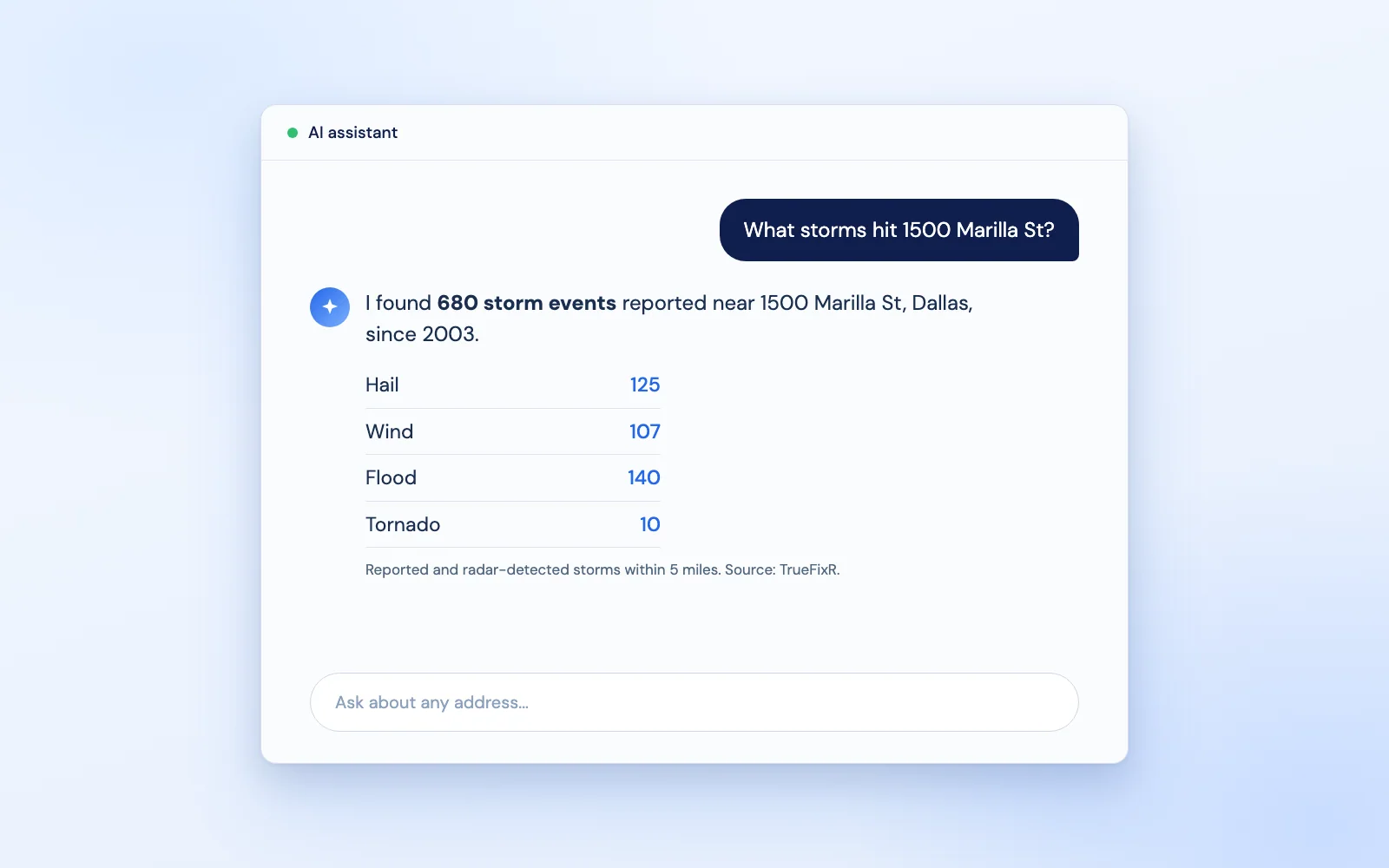
Using the TrueFixR storm API (https://data.truefixr.com/llms.txt), answer storm questions from real data, not guesses. Start with: what storms were reported near 1500 Marilla St, Dallas? My key: YOUR_KEY
Using the TrueFixR storm API (https://data.truefixr.com/llms.txt), how many addresses had hail reported nearby in Dallas County, TX in the last 30 days? My key: YOUR_KEY
Paste it into ChatGPT or Claude, swap in your address and your key.
More detail for your AI
I am not a programmer. I want you (or my AI assistant) to answer storm questions from real data instead of guessing.

Base URL: https://data.truefixr.com
Docs: https://truefixr.com/docs.html
Free menu of everything the API offers: https://data.truefixr.com/v1/data
My API key is YOUR_KEY. Paid calls need the header Authorization: Bearer YOUR_KEY. Free previews need no key.
MCP server (the plug that lets AI tools use this data): https://mcp.atlasunited.io/mcp

Please: (1) tell me in plain words whether I can add this as a connector in the app I am using now, and give me the exact clicks, (2) if I cannot, show me how to use the base URL above instead, with this call: GET https://data.truefixr.com/v1/data?dataset=address&lat=32.78&lon=-96.80 (free preview, no key), (3) give me five good questions to ask, such as "How many storms were reported near this address last year?" and "What is the county forecast status for this spot right now?", (4) after each answer, say which dataset you used.

Rules for you:
- Always start with the free preview and tell me the exact price before any paid call. Never make a paid call without asking me first.
- If you cannot call web addresses yourself, give me the exact link to open in my browser and I will paste back what I see.
- Talk to me like I am not a programmer. Short steps, plain words, tell me exactly what to click or paste.
- These are reported and radar-detected storm events and forecast risk. They are not an inspection and not a damage assessment, so say so in your answer.
How to use it. 1. Press Copy. 2. Open Claude or ChatGPT and paste. 3. Swap YOUR_KEY for your key from Get started, or leave it and stay on the free previews.
Three real questions
Ask. The tool runs. The answer comes from data.
Every number below came back from real free previews. Nothing was invented.
Sample answers written from the real JSON returned on Oct 3, 2026. Live values change.
How it works
Three steps. Nothing to build.
Connect it
Paste the prompt below, or connect the server in one step. Your AI learns the storm data exists.
Your AI looks it up
It picks the right answer type and asks for the free preview with your address.
You get the answer
It writes the reply from the real record and tells you the price before any paid pull.
Copy this
A setup prompt that works.
It tells your AI to look at the free menu first and stay on free previews until you say go.
The setup prompt
You can look up storm data with the storm_data tool. It calls
https://data.truefixr.com/v1/data (GET, query parameters).

1. Read the menu first. Call the tool with no arguments. It lists every
   dataset, its parameters and its price, so you can pick the right one.
2. For a question about the past, use history or storms. For "could it
   happen", use risk. For "right now", use weather.
3. Always use the free preview. Never add addresses=true or details=true.
4. Answer only from the JSON the tool returns. Quote numbers exactly.
   If a field is missing, say you do not have it.
5. Past events are "reported and radar-detected". Forecast risk is
   "could happen". Neither is a property inspection or damage assessment.
6. If the user wants the full paid records, tell them the price shown in
   the preview and let them decide.
Have a developer?
Building your own chatbot?
Give it this one tool definition.
For developers: the tool definition
{
  "name": "storm_data",
  "description": "Look up reported and radar-detected storm history, ML storm forecasts, and model-based weather for a US location. Call with no arguments first to read the menu of datasets.",
  "parameters": {
    "type": "object",
    "properties": {
      "dataset": {
        "type": "string",
        "enum": ["storms", "risk", "history", "hazard_score", "address", "weather", "facilities", "wildfire", "at_risk", "coverage", "daily"],
        "description": "Which dataset to query."
      },
      "lat": { "type": "number", "description": "Latitude." },
      "lon": { "type": "number", "description": "Longitude." },
      "state": { "type": "string", "description": "Two-letter state, for risk and storms." },
      "county": { "type": "string", "description": "County name, for risk and storms." },
      "peril": { "type": "string", "description": "Optional, for example HAIL or FLASH_FLOOD." },
      "date_of_loss": { "type": "string", "description": "YYYY-MM-DD, history only." }
    },
    "required": []
  }
}import requests def storm_data(**args): r = requests.get("https://data.truefixr.com/v1/data", params=args, timeout=30) return r.json() # send this back to the model as the tool result
The schema leaves out addresses and details on purpose, so the model cannot start a paid pull by accident.
No code option
Or connect it in one step.
Add one web address to Claude, ChatGPT or Cursor and the storm lookups appear. Developers call this an MCP server.
https://mcp.atlasunited.io/mcp
Streamable HTTP. Free previews need no key. Tools, as listed by the server:
get_weather_data get_storm_history get_risk_forecast get_property_storm_history_report get_current_weather get_address_report
Discovery built in
Call get_weather_data with no arguments and it returns the full menu of datasets, so the model sees everything the API offers.
Good to know
Price and honest limits.
Previews are free
Every preview costs nothing. Full Model-Based Weather is $0.0002 per call. ML Storm Forecast and Past Storm Leads records are $0.05 per address. Storm History by Address is $0.05 per event line with a $10.00 minimum. Prepaid balance, no contract. Agents can also pay per call with no account: see For agents.
What it is not
Storm data means an event was reported or radar-detected near an address. It is not a property inspection or damage assessment. Forecast risk means it could happen. Coverage is US locations. The free preview gives counts, so have your assistant ask before any paid pull.
Your data. Your template. Your brand. Everything comes back as JSON you can save (lists also as CSV with format=csv).
Start free in 2 minutes. No contract.
Try the free preview first. Add money to your balance only when you want the full answer. You pay only for what you use.
- Free previews
- No contract
- Pay only for what you use